Writing
Markdown cheat sheet
Everything you can use while writing in Pinery—standard GFM plus a few book-specific extras. Scan the tables; copy the examples.
Basics
| Element | Syntax | Notes |
|---|---|---|
| Heading | # … ###### | Optional {#id} for links |
| Paragraph | Blank line between blocks | First-paragraph indent comes from the stylesheet |
| Bold | **bold** or __bold__ | |
| Italic | *italic* or _italic_ | |
| Strikethrough | ~~text~~ | Exactly two tildes |
| Link | [text](url) | #fragment for internal targets |
| Image |  | Filename must match an item in Assets |
| Inline code | `code` | |
| Bullet list | - item or * item | Nest with indent |
| Numbered list | 1. item | Custom start numbers work |
| Blockquote | > quote | |
| Horizontal rule | --- |
Pinery extensions
| Feature | Syntax | What it does |
|---|---|---|
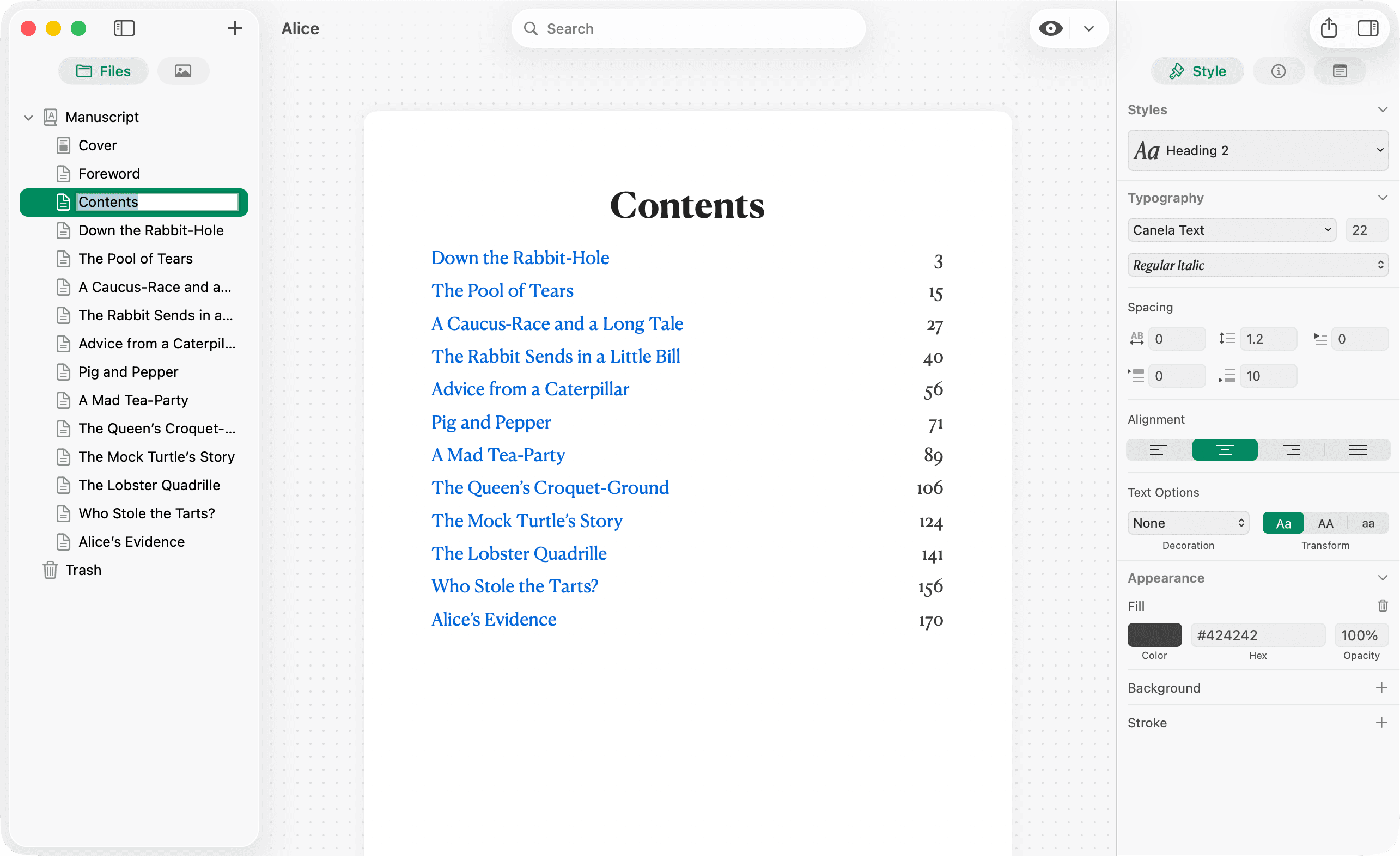
| Table of contents | {{TOC}} | Standalone paragraph; expands in Design and export |
| Heading id | ## Title {#slug} | Stable fragment for cross-links and TOC |
| Mermaid diagram | fenced block with mermaid | Rendered as a chart |
# Table of Contents

{{TOC}}

# Opening {#opening}

Return to [the opening](#opening).
{{TOC}} must sit alone on its line. The generated list includes chapters after the contents chapter (front-matter convention). Configure depth under Metadata → Table of Contents.
Tables
GFM pipe tables with column alignment:
| Character      | Role                   | Action                              |
| :------------- | :--------------------- | :---------------------------------- |
| Alice          | Uninvited Guest        | Applies logic to the madness.       |
| The Hatter     | Eccentric Host         | Asks a **riddle** with no answer.   |
| The March Hare | Co-Host                | Offers fake *wine*; butters a watch.|
| The Dormouse   | Sleepy ~~Storyteller~~ | Used as a cushion; tells stories.   |
Inline formatting works inside cells.
Footnotes
A claim worth citing[^1].

[^1]: Source note. Labels are renumbered in preview.
Footnote definitions appear at the bottom of the page in Design. Custom labels like [^longnote] work in source; preview renumbers them 1, 2, 3…
Code blocks
Specify a language after the opening backticks:
```swift
let page = 42
```
Pinery highlights 70+ languages (for example javascript, python, swift, bash, yaml). See Code blocks & languages for the full list.
Mermaid
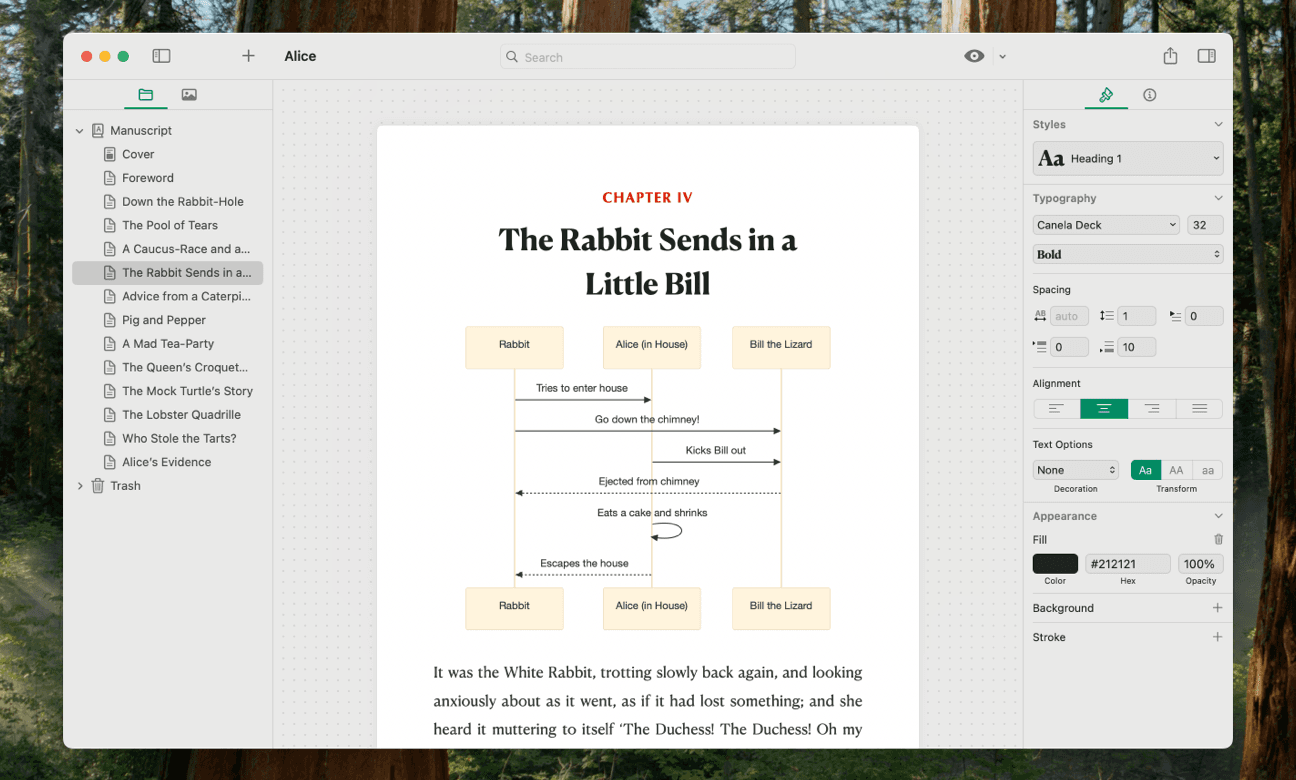
Add Mermaid syntax in a fenced block tagged mermaid:
```mermaid
graph TD;
    A-->B;
    A-->C;
    B-->D;
    C-->D;
```
Diagrams show in Design and when you export to PDF, ePub, or HTML. Details: Mermaid diagrams.
Not supported (yet)
- Wiki-style
[[links]] - Raw HTML in Design
- Task-list checkboxes (they look like normal bullets)
{pagebreak}markers
See Limitations.
Keyboard inserts
| Action | Shortcut |
|---|---|
| Heading 1–6 | ⌘1 … ⌘6 |
| Bold / Italic | ⌘B / ⌘I |
| Strikethrough | ⇧⌘E |
| Link / Image | ⌘K / ⌥⌘I |
| Bullet / Numbered list | ⌘L / ⇧⌘L |
| Blockquote | ⇧⌘U |
| Horizontal rule | ⇧⌘D |
| Inline code | ⌥⌘C |
| Code block | ⌃⌘C |
| Toggle Write / Design | ⌘R |
| Export | ⌘E |
Full list: Keyboard shortcuts.